要在Linux系统上安装Docker及其相关组件,请运行以下命令:
sudo apt-get update
sudo apt-get install docker-ce docker-ce-cli containerd.io docker-buildx-plugin docker-compose-plugin
作者文章归档:陈海峰
要在Linux系统上安装Docker及其相关组件,请运行以下命令:
sudo apt-get update
sudo apt-get install docker-ce docker-ce-cli containerd.io docker-buildx-plugin docker-compose-plugin
1. 进入包含子模块的父仓库的根目录。
2. 使用命令 `git submodule deinit 子模块路径`,将子模块从父仓库的配置中删除。
3. 使用命令 `git rm 子模块路径`,删除子模块目录。
4. 提交修改,使用命令 `git commit -m “取消子模块”`。
git登陆保持
git credential-cache exit # 清除缓存
git config --global --unset credential.helper  # 删除
git config --global credential.helper store # 保持到文件
配置用户名邮箱
git config --global user.name "新的用户名"
git config --global user.email "新的邮箱"
git 输入密码后保存密码的文件
rm ~/.git-credentials
原因是一开始的时候, locale默认的语言是none, 一开始执行datetime.strptime缓存的语言是none, %p转化成的正则表达式是"AM/PM" 第一次执行cv2.imshow会强制设置locale的语言为当前计算机默认语言,我这里就是中文, 循环第二次执行到datetime.strptime检测到locale发生变化,会重新缓存语言是中文,解析%p的正则表达式就变成了"上午/
sudo vim /usr/share/applications/qqmusic.desktop
[Desktop Entry]

Name=QQMusic

Exec=/opt/qqmusic/qqmusic %U --no-sandbox

Terminal=false

Type=Application

Icon=qqmusic

StartupWMClass=qqmusic

Comment=Tencent QQMusic

Categories=AudioVideo;Audio;Player;

MimeType=application/x-ogg;application/ogg;import asyncio
import time
from functools import wraps
from concurrent.futures import ThreadPoolExecutor
from typing import List, Callable, Any
# 创建数据库连接池
pool_executor = ThreadPoolExecutor(max_workers=10)
def to_async(func):
@wraps(func)
async def wrapper(*args, *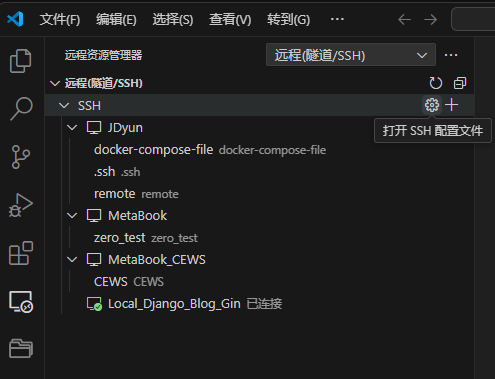
# Read more about SSH config files: https://linux.die.net/man/5/ssh_config
Host Local_Django_Blog_Gin
    HostName 192.168.50.13
    User chf
    PasswordAuthentication yes
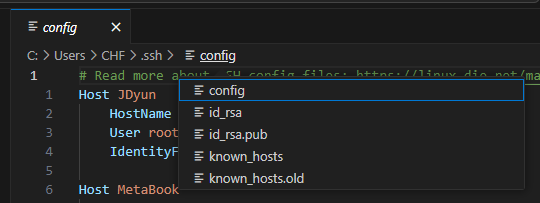
ssh-keygen -t rsa
https://www.lazyvim.org/installation
git clone https://github.com/LazyVim/starter ~/.config/nvim
linux系统记得安装gcc依赖
sudo apt-get install build-essential
https://www.nerdfonts.com/font-downloads
随便下载一个字体,解压后双击点击安装,然后在