VSCode配置
- 解释器
配置vscode python解释器
ctrl + shift + p
输入Python: select intxxxxxx
- 调试环境
把django源码文件复制到指定目录下

用vscode打开

创建调试器信息

创建调试器
ctrl + shift + d

创建成功后会在当前目录自动生成.vscode/launch.json文件

配置launch.json调试器配置
{
    // Use IntelliSense to learn about possible attributes.
    // Hover to view descriptions of existing attributes.
    // For more information, visit: https://go.microsoft.com/fwlink/?linkid=830387
    "version": "0.2.0",
    "configurations": [
        {
            "name": "Python: Django",
            "type": "python",
            "request": "launch",
            "program": "${workspaceFolder}/django/bin/django-admin.py",
            "cwd":"${workspaceFolder}/work-project",
            "env":{"PYTHONPATH":"${workspaceFolder}"},
            "args":[
                "startproject",
                "first_django"
            ],
        }
        // env把django环境指定到当前目录下的,django源码文件,而不是python3中的django
        // workspaceFolder 根目录路径
        // cd 到 cwd目录, 执行 python django-admin.py startproject first_django
    ]
}
目录结构
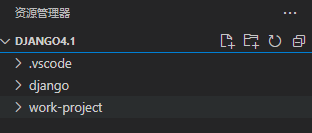
- vscode文件夹为调试器自动创建
- django为源码
- work-project为空目录,用来保存创建好的项目
1. django-admin创建项目测试
- 创建django/bin/django-admin.py文件
# -*- coding: utf-8 -*-
import re
import sys

from django.core.management import execute_from_command_line

if __name__ == '__main__':
    # 0 当前文件地址, 1 路径参数django-admin ,2 路径参数 first_django
    sys.argv[0] = re.sub(r'(-script\.pyw?|\.exe)?$', '', sys.argv[0])
    sys.exit(execute_from_command_line())
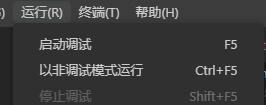
- 创建断点测试

django-admin分析
每次调用django-admin xxxxxxx xxxx
会调用django.core.management下的execute_from-command_line函数
-------------
import re
import sys

from django.core.management import execute_from_command_line

if __name__ == '__main__':
    # 0 当前文件地址, 1 路径参数django-admin ,2 路径参数 first_django
    sys.argv[0] = re.sub(r'(-script\.pyw?|\.exe)?$', '', sys.argv[0])
    sys.exit(execute_from_command_line())
-------------
1..django 调试
1.1 安装Django插件
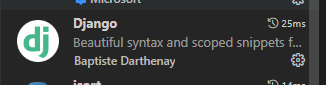 1.2 创建重新创建调试器
- 选择django,而不是python file
{
    // 使用 IntelliSense 了解相关属性。
    // 悬停以查看现有属性的描述。
    // 欲了解更多信息,请访问: https://go.microsoft.com/fwlink/?linkid=830387
    "version": "0.2.0",
    "configurations": [
        {
            "name": "Python: Django",
            "type": "python",
            "request": "launch",
            "program": "${workspaceFolder}\\work-project\\first_django\\manage.py",
            "args": [
                "runserver",
                "127.0.0.1:8000",
                "--noreload"
            ],
            "django": true,
            "justMyCode": false // true不进入模块进行断点

        }
    ]
}
源码分析
1.manage.py-4个重要命令是实战与思考
配置
目录位置
django-work\core\management\commands
1.1创建App
python manage.py startapp books
目录结构
│  manage.py
│
├─books
│  │  admin.py
│  │  apps.py
│  │  models.py
│  │  tests.py
│  │  views.py
│  │  __init__.py
│  │
│  └─migrations
│          __init__.py
│
└─first_django
    │  asgi.py
    │  settings.py
    │  urls.py
    │  views.py
    │  wsgi.py
    │  __init__.py
    │
    └─__pycache__
            settings.cpython-310.pyc
            urls.cpython-310.pyc
            views.cpython-310.pyc
            wsgi.cpython-310.pyc
            __init__.cpython-310.pyc
2.在books应用Models.py
from django.db import models

# Create your models here.

class Books(models.Model):
    sex_choice = (
        (0, '男'),
        (1, '女')
    )
    book_name = models.CharField(verbose_name='图书名', max_length=30)
    author = models.CharField(verbose_name='作者', max_length=30)
    sex = models.SmallIntegerField(verbose_name='性别', choices=sex_choice, default=0)
    price = models.FloatField('图书价格')
    isbn = models.CharField(verbose_name='图书的isbn号', null=False, max_length=30)
    publish_date = models.DateField(verbose_name='出版时间', auto_now=True)

    def __str__(self) -> str:
        return "<%s, %s>" % (self.book_name, self.author)

    class Meta:
        db_table = 'books'
3. SFTP文件映射
3.1 安装插件
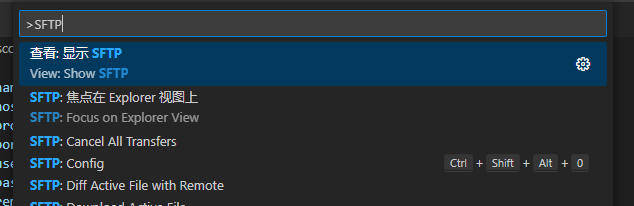
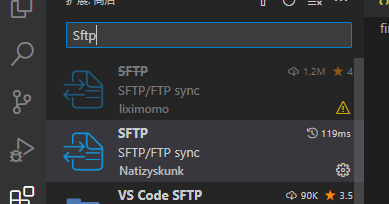 3.2ctrl + shift + p 选择 SFTP:Config
 3.3配置文件
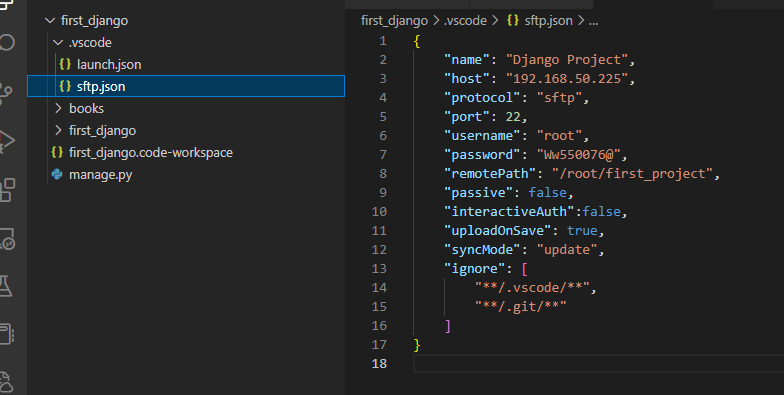
{
    "name": "Django Project",
    "host": "192.168.50.225",
    "protocol": "sftp",
    "port": 22,
    "username": "root",
    "password": "Ww550076@",
    "remotePath": "/root/first_project",
    "passive": false,
    "interactiveAuth":false,
    "uploadOnSave": true,  // 每次ctrl + s 保存都会自动上传
    "syncMode": "update",
    "ignore": [  // 忽略文件
        "**/.vscode/**",
        "**/.git/**"
    ]
}
右键文件点击
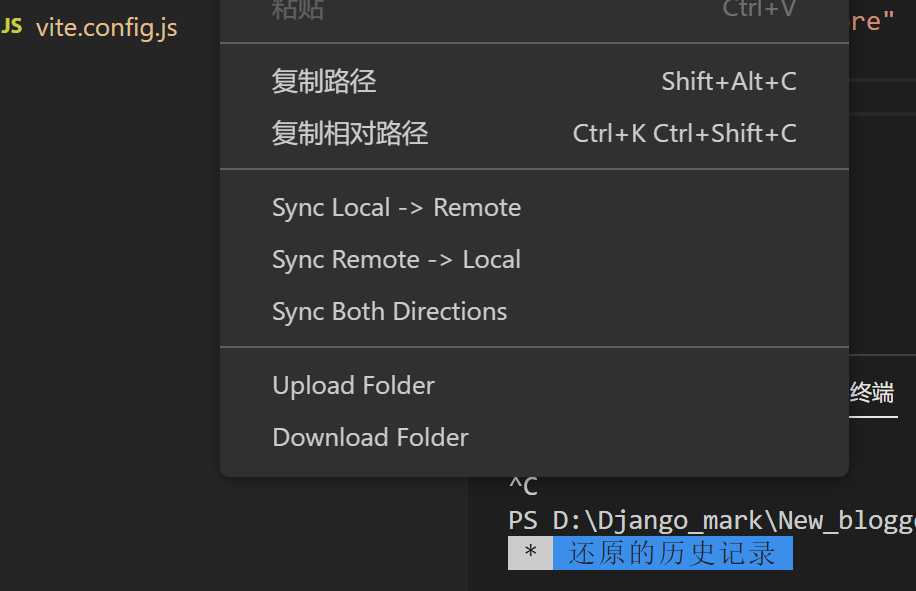
4.添加app
INSTALLED_APPS = [
    'django.contrib.admin',
    'django.contrib.auth',
    'django.contrib.contenttypes',
    'django.contrib.sessions',
    'django.contrib.messages',
    'django.contrib.staticfiles',
    'books', # 添加应用
]
5. 在SFTP映射的虚拟机中操作(生成迁移文件)
# 1查看虚拟环境
(base) [root@localhost first_project]# conda env list
# conda environments:
#
base                  *  /Anaconda/anaconda3
django-markdown          /Anaconda/anaconda3/envs/django-markdown

# 2切换到虚拟环境
(base) [root@localhost first_project]# conda activate django-markdown
(django-markdown) [root@localhost first_project]# ls
books  first_django  first_django.code-workspace  manage.py
# 3安装mysqlclient
(django-markdown) [root@localhost first_project]# conda install mysqlclient

# 4生成迁移文件
(django-markdown) [root@localhost first_project]# python manage.py makemigrations books
Migrations for 'books':
  books/migrations/0001_initial.py
    - Create model Books
(django-markdown) [root@localhost first_project]# cat books/migrations/0001_initial.py

# 5执行数据库迁移
(django-markdown) [root@localhost first_project]# python manage.py migrate books
Operations to perform:
  Apply all migrations: books
Running migrations:
  Applying books.0001_initial... OK
"""Django's command-line utility for administrative tasks."""
import os
import sys

# 测试
def main():
    """Run administrative tasks."""
    os.environ.setdefault('DJANGO_SETTINGS_MODULE', 'first_django.settings')
    try:
        from django.core.management import execute_from_command_line
    except ImportError as exc:
        raise ImportError(
            "Couldn't import Django. Are you sure it's installed and "
            "available on your PYTHONPATH environment variable? Did you "
            "forget to activate a virtual environment?"
        ) from exc
    execute_from_command_line(sys.argv)   # python manage.py runserver 8000


if __name__ == '__main__':
    main()


调用manage.py和django-admin一样调用execute_from_command_line函数
传入sys.argv[runserver,8000]终端参数
def execute_from_command_line(argv=None):
    """Run a ManagementUtility."""
    # 实例化对象
    utility = ManagementUtility(argv)
    # 调用对象,execute()方法
    utility.execute()
三种help
(django-markdown) [root@localhost first_project]# python manage.py help --commands
changepassword
check
clearsessions
collectstatic
compilemessages
createcachetable
createsuperuser
dbshell
diffsettings
dumpdata
findstatic
flush
inspectdb
loaddata
makemessages
makemigrations
migrate
optimizemigration
remove_stale_contenttypes
runserver
sendtestemail
shell
showmigrations
sqlflush
sqlmigrate
sqlsequencereset
squashmigrations
startapp
startproject
test
testserver
1. shell命令与python调试环境的不同
2. startproject 命令-创建项目
3. makemigrations 命令-生成迁移文件
4. migrate 命令-迁移
2.ORM框架源码解析
- 读取数据setting操作和默认内置项主要是在django.conf.global_settings.py
2.1 原生mysqkclient
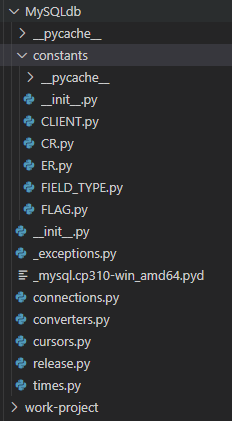
import MySQLdb
db_conf = {host:'192.168.50.225',port:3339,user:'ouzijun',password:'ouzijun',db:'test_user', charset:'utf8'}

conn = MySQLdb.Connect(**db_conf)

cursor = conn.cursor()

# 查询
cusor.execute('select * from books') 返回query数据量
# 获取当前指向的游标数据
cusor.fetchone()
# 获取多个游标数据
cusor.fetchmany(2)
# 返回所有游标数据
cusor.fetchall()

# 提交
cusor.execute("insert into books(book_name,author,sex,price,isbn,publish_date) values('峰哥转','峰大佬',0,'120','草','2022-11-26')")
conn.commit()
2.2django shell 的connection模块
(django-markdown) [root@localhost first_project]# python manage.py shell
路径:/Anaconda/anaconda3/envs/django-markdown/lib/python3.10/site-packages/django/core/management
Python 3.10.8 (main, Nov  4 2022, 13:48:29) [GCC 11.2.0] on linux
Type "help", "copyright", "credits" or "license" for more information.
(InteractiveConsole)
>>> from django.db import connection
>>> connection
<django.utils.connection.ConnectionProxy object at 0x7f1cab7c06d0>
>>> cursor = connection.cursor()
>>> cursor.execute('select * from books')
2
>>> cursor.fetchone()
(1, '演员的自我修养', '陈海峰', 0, 118.0, '', datetime.date(2022, 11, 22))
>>> cursor.fetchone()
(2, '峰哥转', '峰大佬', 0, 120.0, '草', datetime.date(2022, 11, 26))
>>> cursor.fetchone()
>>>
/django/db/backends/mysql/base.py
- django\db__init__.py
- connections = ConnectionHandler()
- def create_connection(self, alias):
- django\db\backends\mysql\base.py -> def create_cursor(self, name=None):
- class CursorWrapper:
- connection = ConnectionProxy(connections, DEFAULT_DB_ALIAS)
-
本质就是对mysqlclient的封装
- django\db\backends\mysql\base.py
# 核心在于__getattr__魔法函数,
# 在执行CursorWrapper.cursor()的时候,会触发__getattr__魔法函数
# 相当于调用MySQLdb里的方法
class CursorWrapper:
    """
    A thin wrapper around MySQLdb's normal cursor class that catches particular
    exception instances and reraises them with the correct types.

    Implemented as a wrapper, rather than a subclass, so that it isn't stuck
    to the particular underlying representation returned by Connection.cursor().
    """

    codes_for_integrityerror = (
        1048,  # Column cannot be null
        1690,  # BIGINT UNSIGNED value is out of range
        3819,  # CHECK constraint is violated
        4025,  # CHECK constraint failed
    )

    def __init__(self, cursor):
        self.cursor = cursor

    def execute(self, query, args=None):
        try:
            # args is None means no string interpolation
            return self.cursor.execute(query, args)
        except Database.OperationalError as e:
            # Map some error codes to IntegrityError, since they seem to be
            # misclassified and Django would prefer the more logical place.
            if e.args[0] in self.codes_for_integrityerror:
                raise IntegrityError(*tuple(e.args))
            raise

    def executemany(self, query, args):
        try:
            return self.cursor.executemany(query, args)
        except Database.OperationalError as e:
            # Map some error codes to IntegrityError, since they seem to be
            # misclassified and Django would prefer the more logical place.
            if e.args[0] in self.codes_for_integrityerror:
                raise IntegrityError(*tuple(e.args))
            raise

    def __getattr__(self, attr):
        return getattr(self.cursor, attr)

    def __iter__(self):
        return iter(self.cursor)
class DatabaseWrapper(BaseDatabaseWrapper):
    vendor = "mysql"
    # This dictionary maps Field objects to their associated MySQL column
    # types, as strings. Column-type strings can contain format strings; they'll
    # be interpolated against the values of Field.__dict__ before being output.
    # If a column type is set to None, it won't be included in the output.
    data_types = {
        "AutoField": "integer AUTO_INCREMENT",
        "BigAutoField": "bigint AUTO_INCREMENT",
        "BinaryField": "longblob",
        "BooleanField": "bool",
        "CharField": "varchar(%(max_length)s)",
        "DateField": "date",
        "DateTimeField": "datetime(6)",
        "DecimalField": "numeric(%(max_digits)s, %(decimal_places)s)",
        "DurationField": "bigint",
        "FileField": "varchar(%(max_length)s)",
        "FilePathField": "varchar(%(max_length)s)",
        "FloatField": "double precision",
        "IntegerField": "integer",
        "BigIntegerField": "bigint",
        "IPAddressField": "char(15)",
        "GenericIPAddressField": "char(39)",
        "JSONField": "json",
        "OneToOneField": "integer",
        "PositiveBigIntegerField": "bigint UNSIGNED",
        "PositiveIntegerField": "integer UNSIGNED",
        "PositiveSmallIntegerField": "smallint UNSIGNED",
        "SlugField": "varchar(%(max_length)s)",
        "SmallAutoField": "smallint AUTO_INCREMENT",
        "SmallIntegerField": "smallint",
        "TextField": "longtext",
        "TimeField": "time(6)",
        "UUIDField": "char(32)",
    }

    # For these data types:
    # - MySQL < 8.0.13 doesn't accept default values and implicitly treats them
    #   as nullable
    # - all versions of MySQL and MariaDB don't support full width database
    #   indexes
    _limited_data_types = (
        "tinyblob",
        "blob",
        "mediumblob",
        "longblob",
        "tinytext",
        "text",
        "mediumtext",
        "longtext",
        "json",
    )

    operators = {
        "exact": "= %s",
        "iexact": "LIKE %s",
        "contains": "LIKE BINARY %s",
        "icontains": "LIKE %s",
        "gt": "> %s",
        "gte": ">= %s",
        "lt": "< %s",
        "lte": "<= %s",
        "startswith": "LIKE BINARY %s",
        "endswith": "LIKE BINARY %s",
        "istartswith": "LIKE %s",
        "iendswith": "LIKE %s",
    }

    # The patterns below are used to generate SQL pattern lookup clauses when
    # the right-hand side of the lookup isn't a raw string (it might be an expression
    # or the result of a bilateral transformation).
    # In those cases, special characters for LIKE operators (e.g. \, *, _) should be
    # escaped on database side.
    #
    # Note: we use str.format() here for readability as '%' is used as a wildcard for
    # the LIKE operator.
    pattern_esc = r"REPLACE(REPLACE(REPLACE({}, '\\', '\\\\'), '%%', '\%%'), '_', '\_')"
    pattern_ops = {
        "contains": "LIKE BINARY CONCAT('%%', {}, '%%')",
        "icontains": "LIKE CONCAT('%%', {}, '%%')",
        "startswith": "LIKE BINARY CONCAT({}, '%%')",
        "istartswith": "LIKE CONCAT({}, '%%')",
        "endswith": "LIKE BINARY CONCAT('%%', {})",
        "iendswith": "LIKE CONCAT('%%', {})",
    }

    isolation_levels = {
        "read uncommitted",
        "read committed",
        "repeatable read",
        "serializable",
    }

    Database = Database
    SchemaEditorClass = DatabaseSchemaEditor
    # Classes instantiated in __init__().
    client_class = DatabaseClient
    creation_class = DatabaseCreation
    features_class = DatabaseFeatures
    introspection_class = DatabaseIntrospection
    ops_class = DatabaseOperations
    validation_class = DatabaseValidation
sql内部封装思路
1.
django\db\__init__.py -->

2.
connections = ConnectionHandler(BaseConnectionHandler) -->

3.
def __getitem__(self, alias):
    conn = self.create_connection(alias) -->

4.
def create_connection(self, alias):
    # backend就是配置的setting-DB模块导入
    return backend.DatabaseWrapper(db, alias)  -->

5.django\db\backends\mysql\base.py
class DatabaseWrapper(BaseDatabaseWrapper):-->

6.
django\db\backends\base\base.py
class BaseDatabaseWrapper:
    ...
    @async_unsafe
    def connect(self):
        """Connect to the database. Assume that the connection is closed."""
        # Check for invalid configurations.
        self.check_settings()
        # In case the previous connection was closed while in an atomic block
        self.in_atomic_block = False
        self.savepoint_ids = []
        self.atomic_blocks = []
        self.needs_rollback = False
        # Reset parameters defining when to close/health-check the connection.
        self.health_check_enabled = self.settings_dict["CONN_HEALTH_CHECKS"]
        max_age = self.settings_dict["CONN_MAX_AGE"]
        self.close_at = None if max_age is None else time.monotonic() + max_age
        self.closed_in_transaction = False
        self.errors_occurred = False
        # New connections are healthy.
        self.health_check_done = True
        # Establish the connection
        conn_params = self.get_connection_params()
        self.connection = self.get_new_connection(conn_params)
        self.set_autocommit(self.settings_dict["AUTOCOMMIT"])
        self.init_connection_state()
        connection_created.send(sender=self.__class__, connection=self)

        self.run_on_commit = []

    @async_unsafe
    def ensure_connection(self):
        """Guarantee that a connection to the database is established."""
        if self.connection is None:
            with self.wrap_database_errors:
                self.connect()

    def _cursor(self, name=None):
            self.close_if_health_check_failed()
            self.ensure_connection()  # 检查是否连接
            with self.wrap_database_errors:
                return self._prepare_cursor(self.create_cursor(name))

    @async_unsafe
    def cursor(self):
        """Create a cursor, opening a connection if necessary."""
        return self._cursor()
问题1
1. 为什么调用save()能在数据库生成对应记录
2.QuerySet是什么? 为什么可以切片
3.objects.all().filter() 与 objects.filter()区别
4.firter(xxx__contains='xxxxx')语句(字段__countains='xxx')背后执行背后原理
4.QuerySet中的first() , last() count(),get()等方法背后原理
5.Book.Objects 的obj的从何而来
>>> Books.objects
<django.db.models.manager.Manager object at 0x7f71bf058fa0>
6. 为什么all()能获取QuerySet
4.问题答案解答
- django\db\models\sql\query.py
4.1RawQuery对象
class RawQuery:
    """A single raw SQL query."""

    def __init__(self, sql, using, params=()):
        self.params = params  # cursor.execute(sql, params)
        self.sql = sql  # sql语句
        self.using = using  # 'default'
        self.cursor = None  # 多次封装后的cursor对象.

        # Mirror some properties of a normal query so that
        # the compiler can be used to process results.
        self.low_mark, self.high_mark = 0, None  # Used for offset/limit
        self.extra_select = {}
        self.annotation_select = {}

    def chain(self, using):
        # 实现链式操作 # filter().filter().get()
        return self.clone(using)

    def clone(self, using):
        # 返回一个新的RawQuery对象(using可以选择外面提供)
        return RawQuery(self.sql, using, params=self.params)

    def get_columns(self):
        # 根据sql语句,获取对应的字段列表
        if self.cursor is None:
            self._execute_query()   # 调用查询方法
        converter = connections[self.using].introspection.identifier_converter  # DatabaseWrapper对象的self.inrospection就是DatabaseIntrospection 里的identifier_converter方法-> 返回传入参数,没有任何处理
        return [converter(column_meta[0]) for column_meta in self.cursor.description] # self.cursor.description,django没有重写, 会执行__getattr__(),来源与原生MySQLdb

    def __iter__(self):
        # Always execute a new query for a new iterator.
        # This could be optimized with a cache at the expense of RAM.
        self._execute_query()
        if not connections[self.using].features.can_use_chunked_reads:
            # If the database can't use chunked reads we need to make sure we
            # evaluate the entire query up front.
            result = list(self.cursor)
        else:
            result = self.cursor
        return iter(result)

    def __repr__(self):
        return "<%s: %s>" % (self.__class__.__name__, self)

    @property
    def params_type(self):
        if self.params is None:
            return None
        return dict if isinstance(self.params, Mapping) else tuple

    def __str__(self):
        if self.params_type is None:
            return self.sql
        return self.sql % self.params_type(self.params)

    def _execute_query(self):
        connection = connections[self.using]

        # Adapt parameters to the database, as much as possible considering
        # that the target type isn't known. See #17755.
        params_type = self.params_type
        adapter = connection.ops.adapt_unknown_value
        if params_type is tuple:
            params = tuple(adapter(val) for val in self.params)
        elif params_type is dict:
            params = {key: adapter(val) for key, val in self.params.items()}
        elif params_type is None:
            params = None
        else:
            raise RuntimeError("Unexpected params type: %s" % params_type)

        self.cursor = connection.cursor()  # django里的cursor对象CursorWrapper对象
        self.cursor.execute(self.sql, params)
4.2Query对象
- 实例化
class QuerySet:
查询的结果集
    def __init__(self,_model=None,...)

    _model = xxx #关联的模型类,必传model
    _using = 'default' #选择的数据库
    _query = qoery or sql.Query(self.model) # 关联的查询类
    self._result_cache = None # 缓存的结果集
- 切片
[1:3]

# 使用切片时触发的魔方方法
def __getitem__(self,k):
    if not isinstance(k,(int,slice)): # slice = slice(1,3)
        raise TypeError(...)


# query.set_limits()方法生成limit语句
def set_limits(self, low=None, hight=None):
    ...
- 展示案例
from books.models import Books
from django.db.models.query import QuerySet

queryset = QuerySet(model=Books)  # 实例化

queryset._result_cache   # 结果集
4.3把query翻译成sql
- 并没有去数据库查询
- 克隆query对象, 更新query查询对象返回
qs = Books.objects.all()

# 调用sql_with_params()方法, 翻译成sql
qs.query.sql_with_params()

# 分页方法
qs.query.set_limits(2,4)
4.4获取游标对象
- connection
from django.db import connection

# 创建游标对象
cursor = connection.cursor()

# 查询
cursor.execute('select * from books')

# 获取一个
cursor.fetchone()

# 获取多个
cursor.fetchmany(5)

# 获取所有
cursor.fetchall()
4.5limit解析
article_list_1 = Articles.objects.filter(nid__gte=pk)[1:4]
# django会把切片转换为limit语句
# [1:4]
# limit 4-1 offset 1
3.shell与原生python调试环境的不同
- shell正确使用
(django-markdown) [root@localhost first_project]# python manage.py shell
路径:/Anaconda/anaconda3/envs/django-markdown/lib/python3.10/site-packages/django/core/management
Python 3.10.8 (main, Nov  4 2022, 13:48:29) [GCC 11.2.0] on linux
Type "help", "copyright", "credits" or "license" for more information.
(InteractiveConsole)
>>> from django.conf import settings
>>> settings.DEBUG
True
>>>
- 为什么需要通过shell模式才能找到setting中的配置
# shell与python的不同
不同点1.在环境变量中加载settings.py路径
os.environ.setdefault('DJANGO_SETTINGS_MODULE', 'first_django.settings')
- python错误示范
# centos终端
(django-markdown) [root@localhost first_project]# python
Python 3.10.8 (main, Nov  4 2022, 13:48:29) [GCC 11.2.0] on linux
Type "help", "copyright", "credits" or "license" for more information.
>>> from django.conf import settings
>>> settings
<LazySettings [Unevaluated]>
>>> settings.DEBUG
Traceback (most recent call last):
  File "<stdin>", line 1, in <module>
  File "/Anaconda/anaconda3/envs/django-markdown/lib/python3.10/site-packages/django/conf/__init__.py", line 92, in __getattr__
    self._setup(name)
  File "/Anaconda/anaconda3/envs/django-markdown/lib/python3.10/site-packages/django/conf/__init__.py", line 72, in _setup
    raise ImproperlyConfigured(
django.core.exceptions.ImproperlyConfigured: Requested setting DEBUG, but settings are not configured. You must either define the environment variable DJANGO_SETTINGS_MODULE or call settings.configure() before accessing settings.
>>>

# 翻看源码
def _setup(self, name=None):
        """
        Load the settings module pointed to by the environment variable. This
        is used the first time settings are needed, if the user hasn't
        configured settings manually.
        """
        # 获取环境变量
        settings_module = os.environ.get(ENVIRONMENT_VARIABLE)
        # settings_module = none
        if not settings_module:
            # 抛出异常
            desc = ("setting %s" % name) if name else "settings"
            raise ImproperlyConfigured(
                "Requested %s, but settings are not configured. "
                "You must either define the environment variable %s "
                "or call settings.configure() before accessing settings."
                % (desc, ENVIRONMENT_VARIABLE)
            )

        self._wrapped = Settings(settings_module)
- python正确示范
- 添加settings.py环境后再调用
(django-markdown) [root@localhost first_project]# python
Python 3.10.8 (main, Nov  4 2022, 13:48:29) [GCC 11.2.0] on linux
Type "help", "copyright", "credits" or "license" for more information.
>>> import os
>>> os.environ.setdefault('DJANGO_SETTINGS_MODULE', 'first_django.settings')
'first_django.settings'
>>> from django.conf import settings
>>> settings
<LazySettings [Unevaluated]>
>>> settings.DEBUG
True
>>>
1. 加载setting源码解析
django\conf__init__.py
# 1.初始化
312行 settings = LazySettings()

# 懒加载(思想)
class LazySettings(LazyObject):
- LazySettings 的 _setup方法 self._wrapped = Settings(settings_module)
- -> _wrapped就是获取工程文件global_settings和 配置文件settings.py里的属性
- 当获取settings.xxx属性时执行__getattr__魔法方法获取self._wrapped的属性
# 懒加载的方式
class LazySettings(LazyObject):
    """
    A lazy proxy for either global Django settings or a custom settings object.
    The user can manually configure settings prior to using them. Otherwise,
    Django uses the settings module pointed to by DJANGO_SETTINGS_MODULE.
    """

    def _setup(self, name=None):
        """
        Load the settings module pointed to by the environment variable. This
        is used the first time settings are needed, if the user hasn't
        configured settings manually.
        """
        # 获取环境变量
        settings_module = os.environ.get(ENVIRONMENT_VARIABLE)
        # settings_module = none
        if not settings_module:
            # 抛出异常
            desc = ("setting %s" % name) if name else "settings"
            raise ImproperlyConfigured(
                "Requested %s, but settings are not configured. "
                "You must either define the environment variable %s "
                "or call settings.configure() before accessing settings."
                % (desc, ENVIRONMENT_VARIABLE)
            )
        # setting对象
        self._wrapped = Settings(settings_module)


    def __repr__(self):
        # Hardcode the class name as otherwise it yields 'Settings'.
        if self._wrapped is empty:
            return "<LazySettings [Unevaluated]>"
        return '<LazySettings "%(settings_module)s">' % {
            "settings_module": self._wrapped.SETTINGS_MODULE,
        }

    def __getattr__(self, name):
        """Return the value of a setting and cache it in self.__dict__."""
        if (_wrapped := self._wrapped) is empty:
            self._setup(name)
            _wrapped = self._wrapped
        val = getattr(_wrapped, name)

        # Special case some settings which require further modification.
        # This is done here for performance reasons so the modified value is cached.
        if name in {"MEDIA_URL", "STATIC_URL"} and val is not None:
            val = self._add_script_prefix(val)
        elif name == "SECRET_KEY" and not val:
            raise ImproperlyConfigured("The SECRET_KEY setting must not be empty.")

        self.__dict__[name] = val
        return val

    def __setattr__(self, name, value):
        """
        Set the value of setting. Clear all cached values if _wrapped changes
        (@override_settings does this) or clear single values when set.
        """
        if name == "_wrapped":
            self.__dict__.clear()
        else:
            self.__dict__.pop(name, None)
        super().__setattr__(name, value)

    def __delattr__(self, name):
        """Delete a setting and clear it from cache if needed."""
        super().__delattr__(name)
        self.__dict__.pop(name, None)

    def configure(self, default_settings=global_settings, **options):
        """
        Called to manually configure the settings. The 'default_settings'
        parameter sets where to retrieve any unspecified values from (its
        argument must support attribute access (__getattr__)).
        """
        if self._wrapped is not empty:
            raise RuntimeError("Settings already configured.")
        holder = UserSettingsHolder(default_settings)
        for name, value in options.items():
            if not name.isupper():
                raise TypeError("Setting %r must be uppercase." % name)
            setattr(holder, name, value)
        self._wrapped = holder

    @staticmethod
    def _add_script_prefix(value):
        """
        Add SCRIPT_NAME prefix to relative paths.

        Useful when the app is being served at a subpath and manually prefixing
        subpath to STATIC_URL and MEDIA_URL in settings is inconvenient.
        """
        # Don't apply prefix to absolute paths and URLs.
        if value.startswith(("http://", "https://", "/")):
            return value
        from django.urls import get_script_prefix

        return "%s%s" % (get_script_prefix(), value)

    @property
    def configured(self):
        """Return True if the settings have already been configured."""
        return self._wrapped is not empty

    @property
    def USE_L10N(self):
        stack = traceback.extract_stack()
        # Show a warning if the setting is used outside of Django.
        # Stack index: -1 this line, -2 the LazyObject __getattribute__(),
        # -3 the caller.
        filename, _, _, _ = stack[-3]
        if not filename.startswith(os.path.dirname(django.__file__)):
            warnings.warn(
                USE_L10N_DEPRECATED_MSG,
                RemovedInDjango50Warning,
                stacklevel=2,
            )
        return self.__getattr__("USE_L10N")

    # RemovedInDjango50Warning.
    @property
    def _USE_L10N_INTERNAL(self):
        # Special hook to avoid checking a traceback in internal use on hot
        # paths.
        return self.__getattr__("USE_L10N")
Settings总结
- 先获取setting配置文件环境变量
- 先获取工程global_setting全部大写属性
- 后获取自定义的setting全部大写属性-
class Settings:
    def __init__(self, settings_module):
        # update this dict from global settings (but only for ALL_CAPS settings)
        # settings_module = first_django.setting
        # dir获取global_settings工程里所有定义的属性
        for setting in dir(global_settings):
            # 判断是是大写
            if setting.isupper():
                # 设置 self.setting = global_settings.setting属性值
                setattr(self, setting, getattr(global_settings, setting))

        # store the settings module in case someone later cares
        self.SETTINGS_MODULE = settings_module

        # 导入模块firest_django.settings
        mod = importlib.import_module(self.SETTINGS_MODULE)

        tuple_settings = (
            "ALLOWED_HOSTS",
            "INSTALLED_APPS",
            "TEMPLATE_DIRS",
            "LOCALE_PATHS",
            "SECRET_KEY_FALLBACKS",
        )
        self._explicit_settings = set()
        # 获取Setting文件属性
        for setting in dir(mod):
            # 大写
            if setting.isupper():
                setting_value = getattr(mod, setting)
                # 下面定义的属性,一定是列表或者元组,否则报错
                if setting in tuple_settings and not isinstance(
                    setting_value, (list, tuple)
                ):
                    raise ImproperlyConfigured(
                        "The %s setting must be a list or a tuple." % setting
                    )
                # 再次set属性值, 会覆盖之前工程global_settings设置的属性
                setattr(self, setting, setting_value)
                self._explicit_settings.add(setting)

        if self.USE_TZ is False and not self.is_overridden("USE_TZ"):
            warnings.warn(
                "The default value of USE_TZ will change from False to True "
                "in Django 5.0. Set USE_TZ to False in your project settings "
                "if you want to keep the current default behavior.",
                category=RemovedInDjango50Warning,
            )

        if self.is_overridden("USE_DEPRECATED_PYTZ"):
            warnings.warn(USE_DEPRECATED_PYTZ_DEPRECATED_MSG, RemovedInDjango50Warning)

        if self.is_overridden("CSRF_COOKIE_MASKED"):
            warnings.warn(CSRF_COOKIE_MASKED_DEPRECATED_MSG, RemovedInDjango50Warning)

        if hasattr(time, "tzset") and self.TIME_ZONE:
            # When we can, attempt to validate the timezone. If we can't find
            # this file, no check happens and it's harmless.
            zoneinfo_root = Path("/usr/share/zoneinfo")
            zone_info_file = zoneinfo_root.joinpath(*self.TIME_ZONE.split("/"))
            if zoneinfo_root.exists() and not zone_info_file.exists():
                raise ValueError("Incorrect timezone setting: %s" % self.TIME_ZONE)
            # Move the time zone info into os.environ. See ticket #2315 for why
            # we don't do this unconditionally (breaks Windows).
            os.environ["TZ"] = self.TIME_ZONE
            time.tzset()

        if self.is_overridden("USE_L10N"):
            warnings.warn(USE_L10N_DEPRECATED_MSG, RemovedInDjango50Warning)

    def is_overridden(self, setting):
        return setting in self._explicit_settings

    def __repr__(self):
        return '<%(cls)s "%(settings_module)s">' % {
            "cls": self.__class__.__name__,
            "settings_module": self.SETTINGS_MODULE,
        }
